









For an introduction to being featured on the App Store, check out this comprehensive guide to the concept by Maggie Ngai, where she explores just how impactful featuring is on the App Store.
This article was updated on 18 January 2025.
App Store featuring is one of the most effective ways to boost visibility and downloads. Whether you land in “Must Have Apps” or earn “Editors’ Choice,” featuring lifts your category ranking, driving even more visibility. For that reason, seasonality is one of the most important elements if you want to be featured in a timely and relevant way.
Seasonal events create predictable and remarkable surges in app store activity. According to Adjust’s 2024 research, health and fitness app installs jumped 46% above average on January 1. Gaming apps rose 47% on New Year’s Day. Shopping apps peaked at 25% above average in early December. Deal discovery apps spiked 42% above daily averages during Black Friday week. Apps that prepare for these moments—with optimized metadata, seasonal creatives, and coordinated campaigns—capture a disproportionate share of downloads.
Common seasonal opportunities include:
- Holidays: Christmas, New Year, Easter, Thanksgiving, Halloween
- Shopping events: Black Friday, Cyber Monday, Prime Day, Singles’ Day
- Life events: Back-to-school, tax season, wedding season, New Year’s resolutions
- Sports events: Super Bowl, World Cup, Olympics
- Cultural moments: Carnival (Brazil), Ramadan, Diwali, Golden Week
This article focuses on leveraging seasonality, which we believe is one of the most reliable approaches to App Store optimization. At Phiture, we regularly advise clients on seasonal ASO strategies, and this guide draws on our research and hands-on experience.
Identifying Seasonal ASO Opportunities
Analyzing Trends with ASO Tools
To identify seasonal ASO opportunities, we believe in starting at the core: with your own data. App Store Connect and Google Play Console show historical impressions, downloads, and conversion rates, and you can review the past 12-24 months for patterns aligned with holidays or events.
Third-party tools add another layer, too. AppTweak, Sensor Tower, and Mobile Action provide keyword popularity data over time, revealing when search volume rises and falls. For example, a fitness app might find “workout app” searches triple in early January. A travel app might see “summer vacation” searches peak in May. For a detailed methodology, see our article about applying a Data-Driven Approach to ASO Seasonality.
Creating a Seasonality Calendar
The first priority when planning seasonal ASO is to create a calendar. Make a list of important days likely to resonate with your app’s users. If your app relates to women’s health, International Women’s Day is a natural choice. Naturally, eCommerce apps should prioritize Black Friday.
Then, the next step is to brainstorm how your app can contribute to users on that day. Bear in mind the App Store typically prioritizes popular apps likely to bring revenue, though priorities shift.
We’ve compiled a list of key seasonal days in the US. To create it, we researched holidays across five categories (national, religious, cultural, social cause, and major events), compared them with App Store featured collections using AppTweak, and matched days when Apple featured apps seasonally.
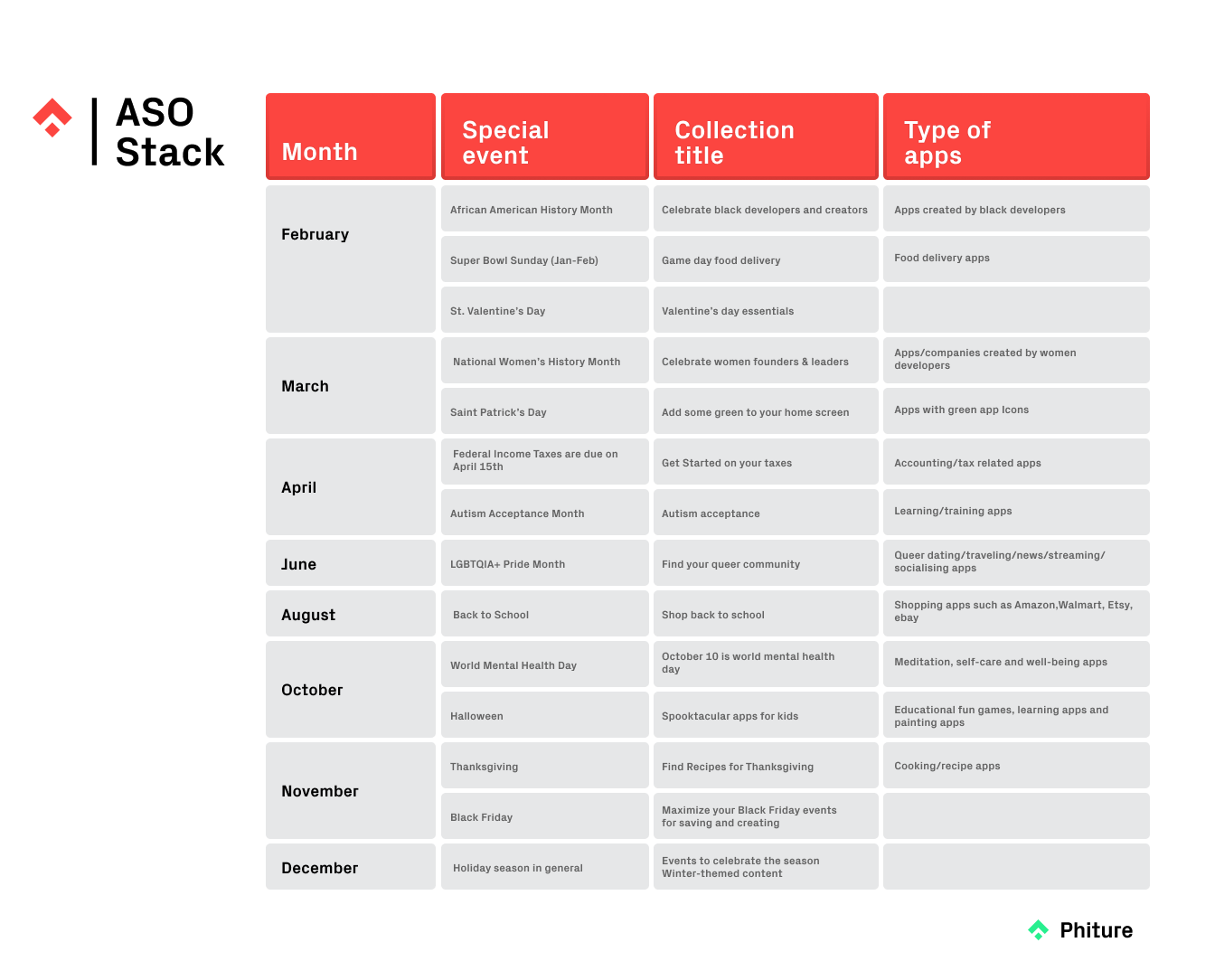
US Seasonality Calendar, showing important seasonal days mapped to App Store featuring opportunities
Seasonal events can be broad, too. The US App Store features collections for summer holidays, back-to-school, and tax season.
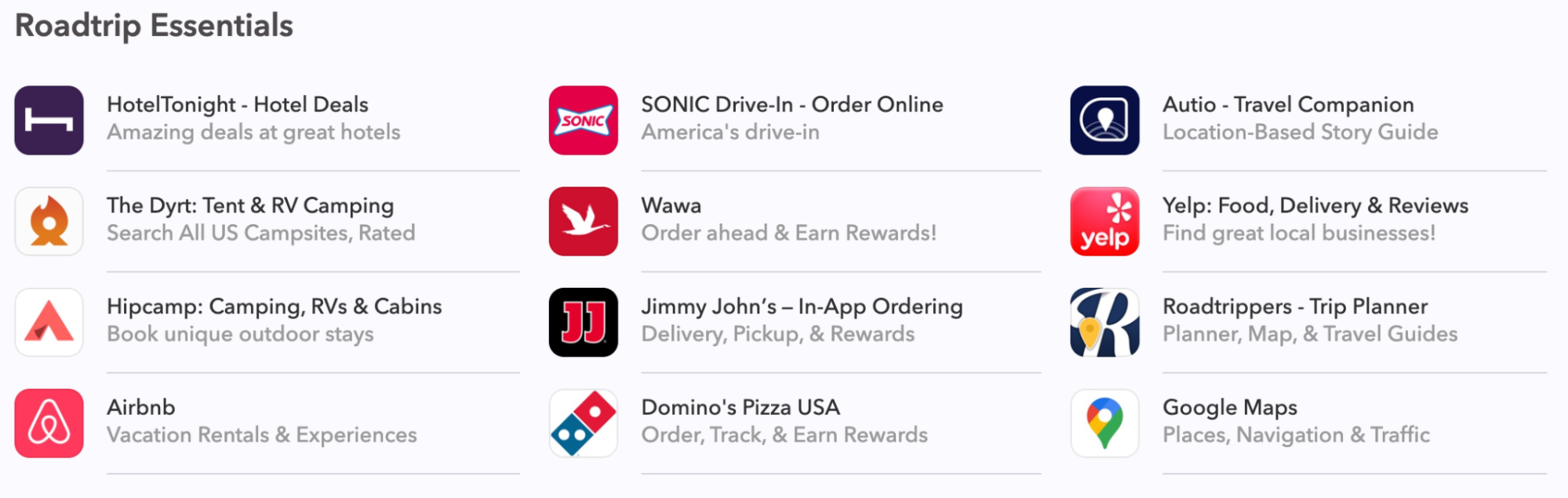
A collection that was published in the US in Apps Tab in the App Store during summer holiday season.
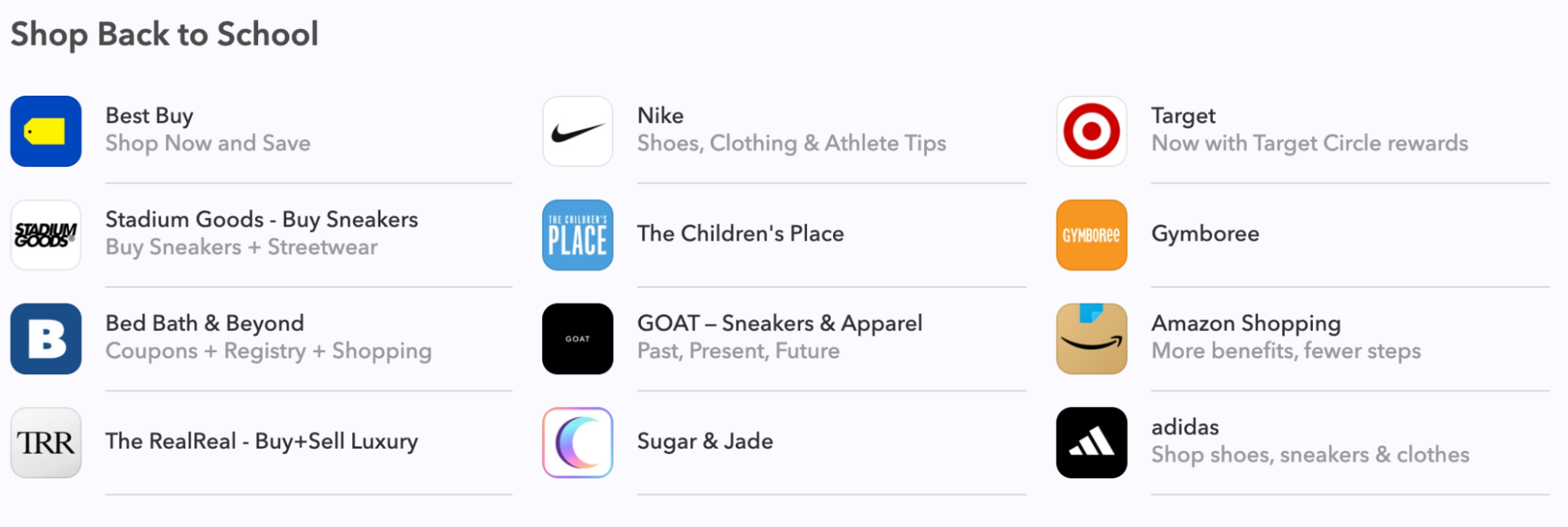
A collection that was published in the US in Apps Tab in the App Store just before the start of the academic year
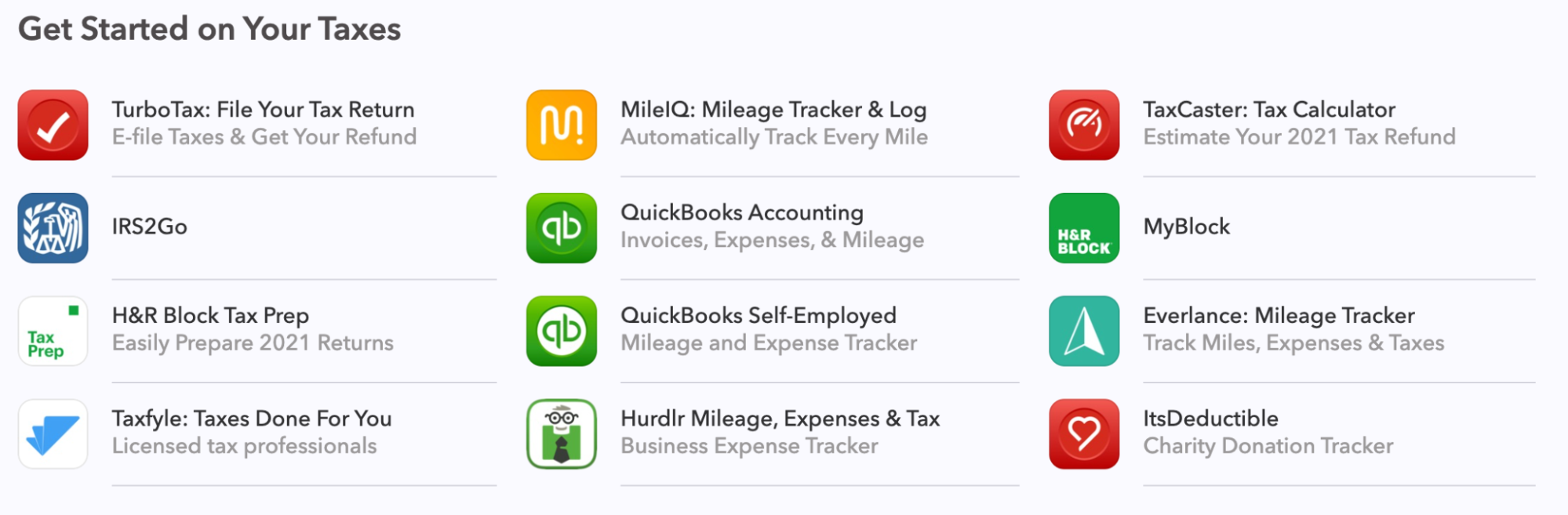
A collection that was published in the US in Apps Tab in the App Store towards the end of tax season.
Although some events are universal (Black Friday, Valentine’s Day), others are country-specific. You can repeat this exercise for any market. For more hands-on advice, read our article on Seasonal Marketing in Your ASO Strategy.
Examples of Seasonal Featuring Success
The link between a seasonal event and your app can be tenuous—and that’s fine. For St Patrick’s Day, Apple created “Add Some Green to Your Home Screen,” featuring apps simply because they had green icons.
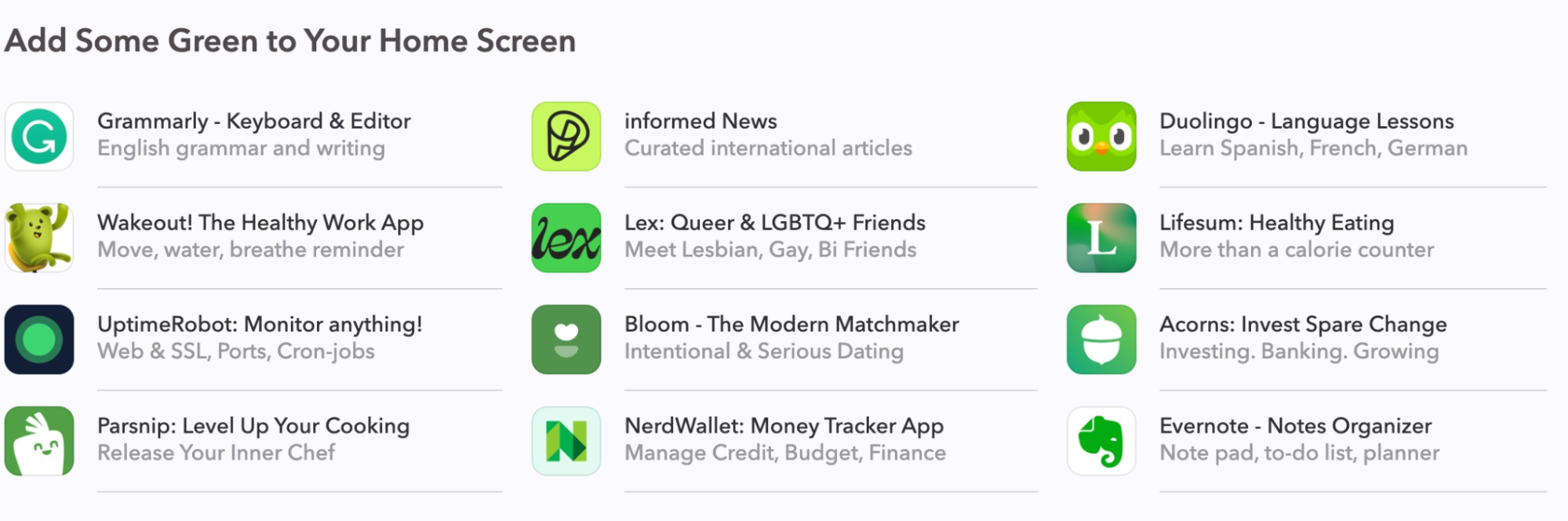
“Add Some Green to Your Home Screen” collection that was published on Apps Tab in the App Store on St. Patrick’s day.
In Brazil, Carnival starts in late February, and the App Store creates various collections highlighting this. Photo filtering apps that capture the festival’s colorful atmosphere get featured prominently.

A collection that was published in Brazil in Apps Tab in the App Store during Carnival season.

Another collection in the App Store Apps tab during the carnival time called “Children’s Carnival.”
In Turkey during Ramadan, the App Store features apps that help fasting users: food ordering apps for breaking fast, and social apps for connecting with family during this time of gathering.
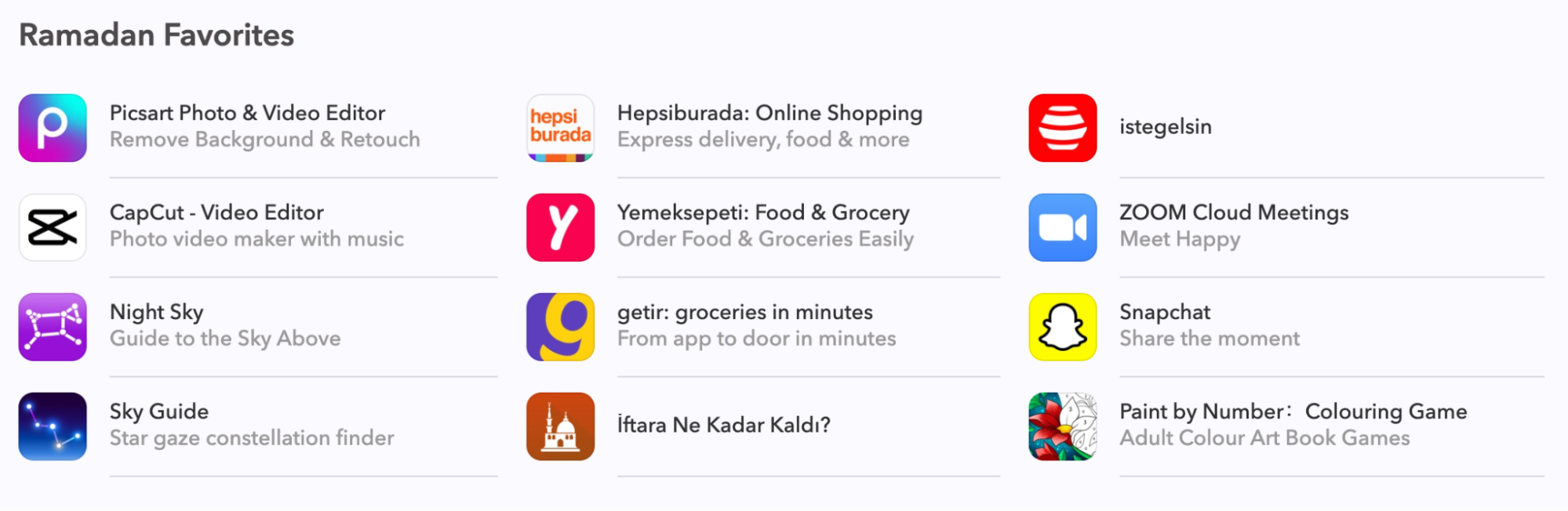
A collection that was published in Turkey on the Apps Tab over Ramadan
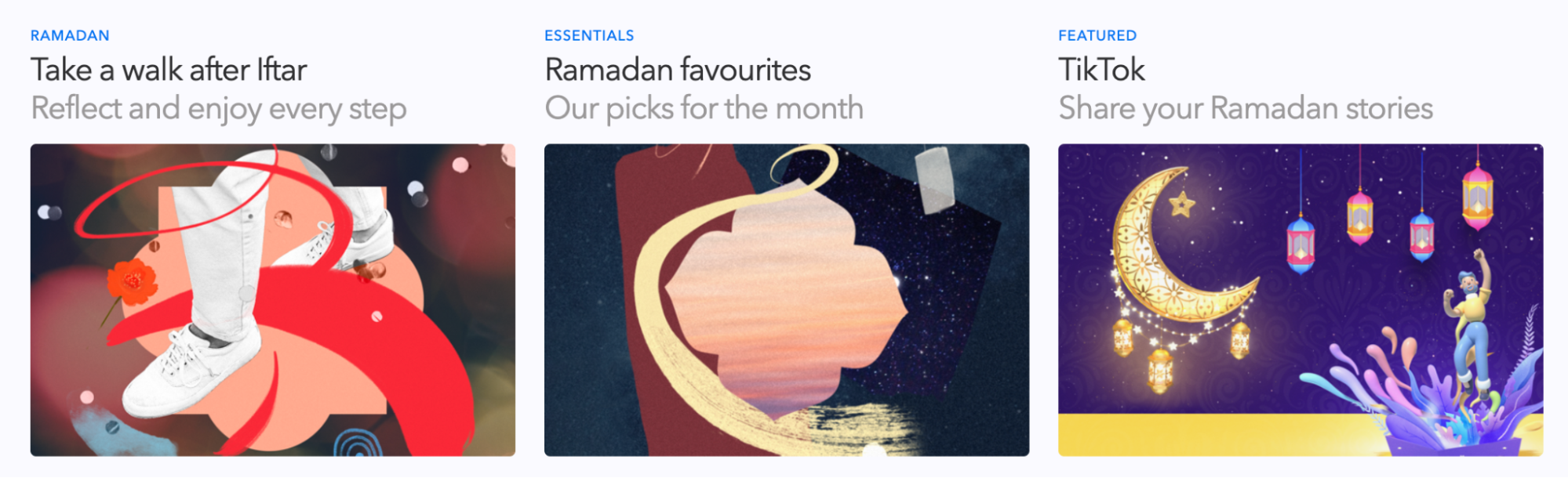
A collection that was published in Turkey in Apps Tab in the App Store during Ramadan month.
Optimizing Metadata and Keywords for Seasonal Trends
Seasonal keyword optimization requires timing. Update too early and you waste prime ranking time; too late and you miss the surge.
For major events like Black Friday, start preparing 4-6 weeks ahead. Submit metadata changes 2-3 weeks before the event to allow time for approval and indexing. This positions your app to capture searches as volume builds.
On iOS, promotional text can be updated without a new app version, which is ideal for time-sensitive seasonal messaging. Use it to highlight seasonal features, limited-time offers, or event-specific content. Google Play’s short description serves a similar purpose.
Identify time-limited keywords aligned with your app’s value proposition:
- Shopping apps: “Black Friday deals,” “holiday sales,” “Christmas gifts”
- Fitness apps: “New Year workout,” “summer body,” “resolution tracker”
- Recipe apps: “Thanksgiving recipes,” “Christmas baking,” “holiday cooking”
- Finance apps: “Tax filing,” “tax calculator,” “budget planner”
Balance seasonal keywords with your core strategy—don’t abandon terms that drive consistent year-round traffic. For comprehensive keyword guidance, see the ASO Stack framework.
Seasonal App Store Creative Optimization
Visual updates can dramatically increase conversion rates during seasonal periods. Research from SplitMetrics found that incorporating festive elements into an app icon delivered a 47% conversion uplift.
Your app icon is the most visible element in search results and featured placements. Subtle seasonal updates (a Santa hat, autumn leaves, hearts for Valentine’s Day, for instance) signal relevance without undermining brand recognition. The St Patrick’s Day example shows how simple visual cues can drive featuring decisions.
Screenshots should reflect seasonal use cases. A shopping app might showcase deal-finding features in November. A recipe app might highlight holiday meal planning. Some apps completely refresh screenshot sets for major seasons; others make subtle updates like adding seasonal banners.
Use Product Page Optimization (PPO) on the App Store and Store Listing Experiments on Google Play to test seasonal variants. Start tests early enough to gather significant results before the peak. Build a library of seasonal assets to repurpose yearly. If you need further information on how to run a killer A/B test, read our article on ASO A/B Testing Methods.
Lastly, Google Play’s Custom Store Listings offer additional flexibility—you can create entirely different store presences for seasonal contexts.
Getting Featured During Seasonal Events
The Apps Tab is where Apple’s Editorial team typically features apps based on seasonality. Here you’ll find thematic collections—”Capture the Moment” for photo apps, “Manage Your Money” for finance apps—and special collections for Black Friday, Halloween, or Christmas.
The criteria Apple uses to select apps are public:
- UI design
- User experience
- Innovation and uniqueness
- Accessibility
- Localization
- Compelling App Store product page
For games, additional factors include gameplay design, art and animation, controls, story, replayability, audio, and technical performance.
Best Practices When Submitting to Apple
Submit featuring requests here, but do this six to eight weeks in advance. Here are a few things to keep in mind before that:
Optimize your store listing first. You have seconds to impress visitors. Make sure your title, subtitle, icon, and screenshots are polished. Use the Product Page Analysis Cheat Sheet to assess your listing.
Tell Apple a great story about your app and seasonality. Highlight the problem your app solves, new features, and key performance metrics like engagement and retention—all connected to the seasonal event. If it’s the holiday season and you’re a navigation app, explain how you help users get home to loved ones faster.
Prepare eye-catching visuals in advance. If Apple is interested, they’ll likely request images. Have seasonal UI mockups and promotional artwork ready. Build a creative asset library to reduce effort for future requests.
Using In-App Events
In-App Events let you promote time-limited content directly on the App Store. They appear on your product page, in search results, and can be featured editorially. Create events aligned with seasonal moments: “New Year Challenge” for fitness apps, “Black Friday Flash Sales” for shopping apps, “Holiday Tournament” for games. The event name and description are indexed for search, giving you additional keyword opportunities. Learn more about In-App Events.
Coordinating Paid and Organic Strategies
Increase paid spend during seasonal peaks when user intent is highest. The same budget delivers better results when users are actively searching for solutions your app provides. A fitness app’s January campaigns will outperform identical campaigns in March.
Use Apple Search Ads to capture high-intent seasonal searches. Custom Product Pages let you create landing experiences tailored to specific campaigns—a user searching “holiday recipes” lands on a page showcasing your app’s holiday features. For Apple Search Ads strategy, see the ASA Stack framework.
Measuring Success and Post-Season Optimization
Monitor these key metrics in App Store Connect and Google Play Console:
- Impressions by source: Are you gaining visibility in search and browse?
- Conversion rate: Are seasonal updates improving installs?
- Installs: Downloads during the seasonal window vs. baseline
- Keyword rankings: Are you gaining position for seasonal terms?
- Category ranking: Are increased downloads lifting your position?
- Featuring placements: Did you secure editorial features?
It’s a long game, so comparing year-over-year when possible is worthwhile. Document what worked and what didn’t, and this can become your starting point for next year. Seasonal ASO compounds over time: an app that has optimized for Black Friday three years running will outperform a first-timer.
Download spikes can boost category ranking significantly, but when the season ends, that ranking can drop fast. Run retention campaigns to keep new users engaged, and maintain baseline ASO efforts between peaks.
Case Study: Seasonal ASO in Action
Conclusion
Seasonal ASO optimization drives meaningful gains in visibility and downloads throughout the year.
Here are a few key takeaways:
- Build a seasonality calendar for your key markets
- Analyze historical data using App Store Connect, Google Play Console, and ASO tools
- Update metadata and keywords 2-3 weeks before seasonal peaks
- Test creative elements before peak periods
- Submit featuring requests 6-8 weeks in advance
- Coordinate paid and organic strategies for maximum impact
- Document learnings to improve next year’s performance
Want to maximize app visibility during peak seasons? Get an ASO consultation to develop your seasonal strategy.
Additional Resources
- Applying a Data-Driven Approach to ASO Seasonality
- How In-App Events Can Boost Your KPIs
- ASO Stack Slack Community – Join 6,000+ ASO practitioners
- Advanced ASO eBook – 600+ pages on App Store Optimization
- For a deep dive into featuring impact, see this guide by Maggie Ngai.
FAQ
How far in advance should I prepare for seasonal events? For major events like Black Friday or Christmas, start 2-3 months ahead. Submit featuring requests 6-8 weeks in advance. For smaller events, 4-6 weeks is sufficient.
Should I update my app icon for seasonal events? Test first. SplitMetrics found a 47% conversion uplift with festive icons, but it requires design resources. Works best for consumer apps in shopping, gaming, and lifestyle categories.
How do seasonal ASO strategies differ between the App Store and Google Play? Core principles are similar, but tools differ. Google Play offers Store Listing Experiments and Custom Store Listings. The App Store provides Product Page Optimization, Custom Product Pages, and In-App Events. Optimize for each platform’s unique capabilities.
Table of Contents