











Apple held its annual developer conference on June 8. For mobile growth and ASO practitioners, the main news is a set of App Store changes built around a new asset system in App Store Connect. There are also platform updates across iOS 27, iPadOS 27, macOS 27, and other operating systems worth knowing about. This article goes through it all.
Note: All features and updates covered in this article were announced at WWDC26 on June 8, 2026. They are currently in developer beta and will be publicly released this fall, likely in September, alongside iOS 27 and iPadOS 27.
Creative Assets: Header
Apple renamed its “Feature Banner” asset as “Header”. This asset is now available for editing, uploading, and review in the App Store Connect (previously, this asset was only available for selected developers, and its update needed to be done through a request from the Editorial team via email or under the Promotional Artwork section).
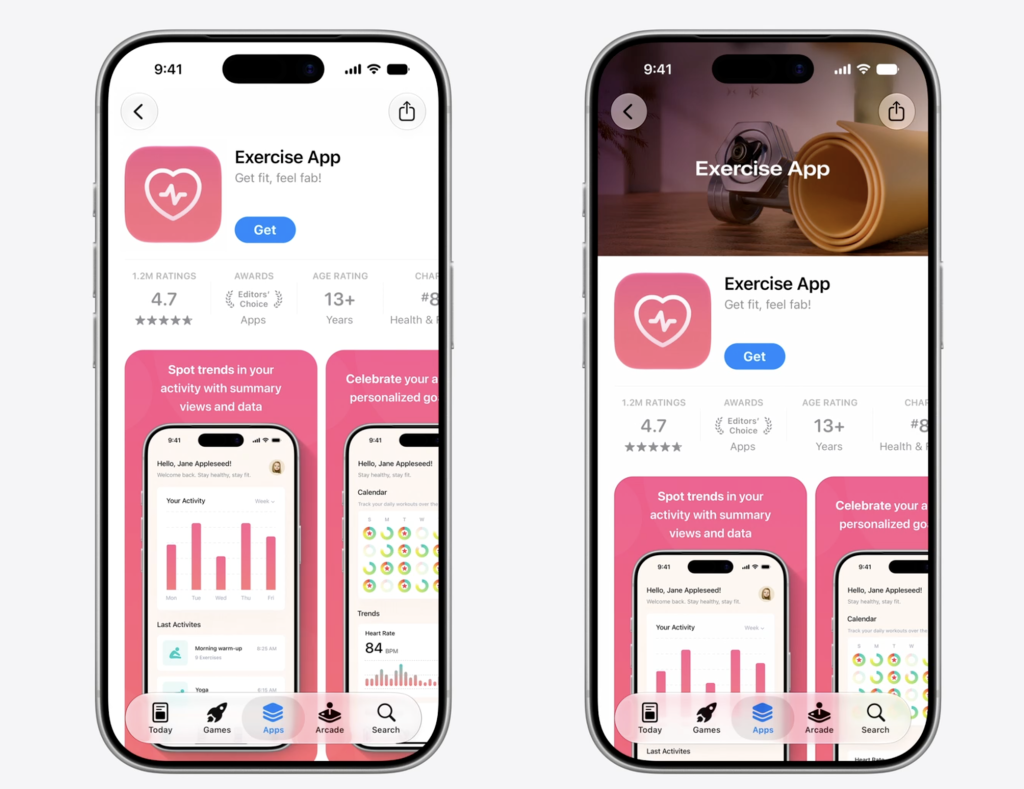
The Header can be images or videos, which are separate from your standard screenshots and app previews. They have their own upload flow and review process, and they appear in placements that screenshots haven’t historically covered, specifically the product page header, and can also be selected as the App Store search results. The assets can be pre-approved and used as per the requirement.
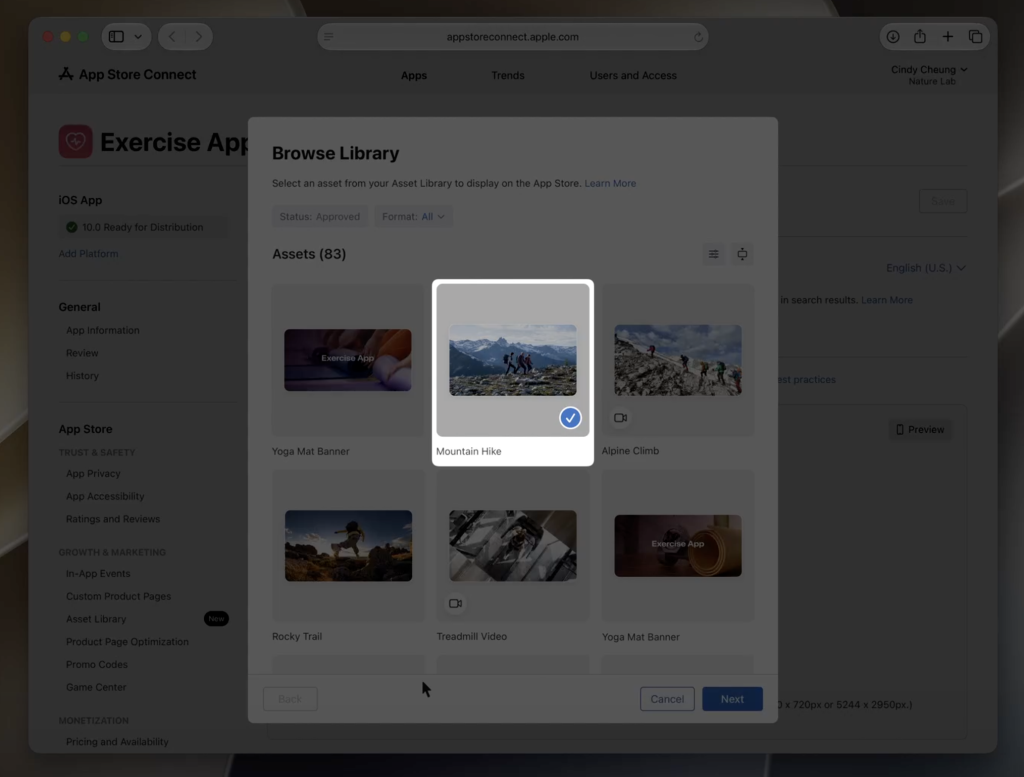
A few things worth knowing about the Header:
- They can be completely different from your existing screenshots and app preview. You’re not locked into reusing what you already have.
- They work across Custom Product Pages (Search & Today Tab), the main product page, and Product Page Optimization tests.
- They can be used for both organic store placements and paid Apple Ads, from the same library.
- They apply to iOS 27 and iPadOS 27.
Apple’s What’s New on the App Store page notes that the Header can be used to highlight a brand, promote seasonal content, or showcase new features, since screenshots are tied to the actual UI of the app.
The Asset Library
App Store Connect now has a centralized Asset Library where you can manage all of your app’s visuals in one place: screenshots, app previews, header, organized by platform, size, and selected placement for it to be displayed in.
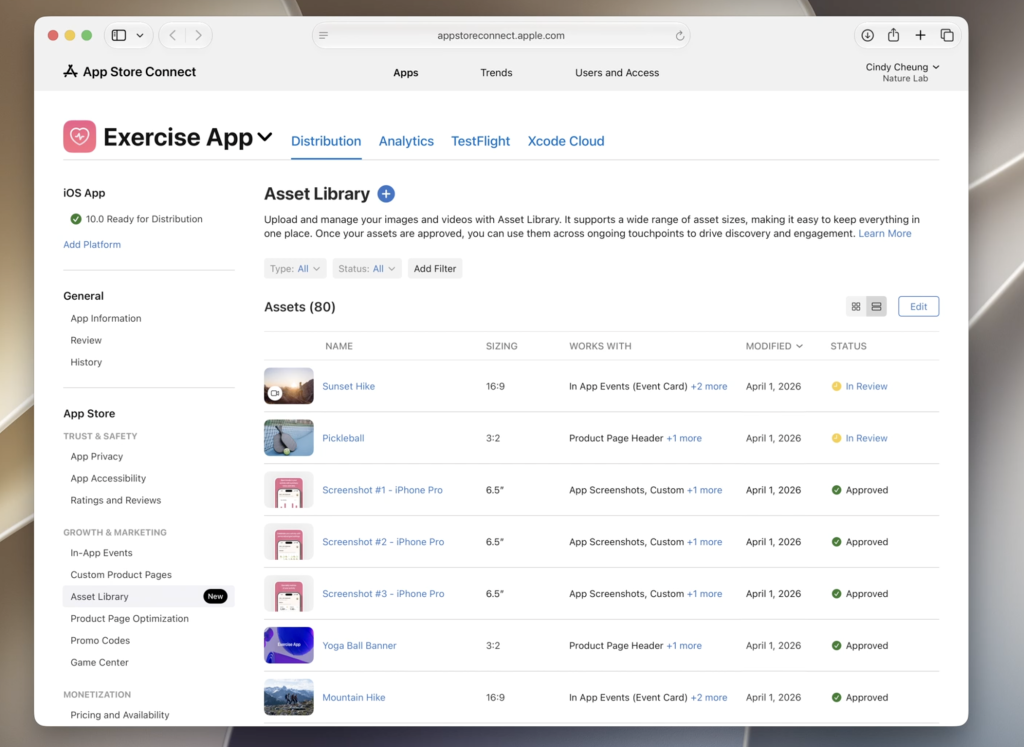
The workflow change here is that assets can be submitted for App Review independently of an app update. No new build required. Once assets are approved, they can go live on your store listing and/or on your Apple Ads, at any time. Apple’s App Store enhancements page confirms that assets can also be reused across Custom Product Pages and In-App Events, reducing redundant uploads when managing multiple CPPs or event promotional campaigns.
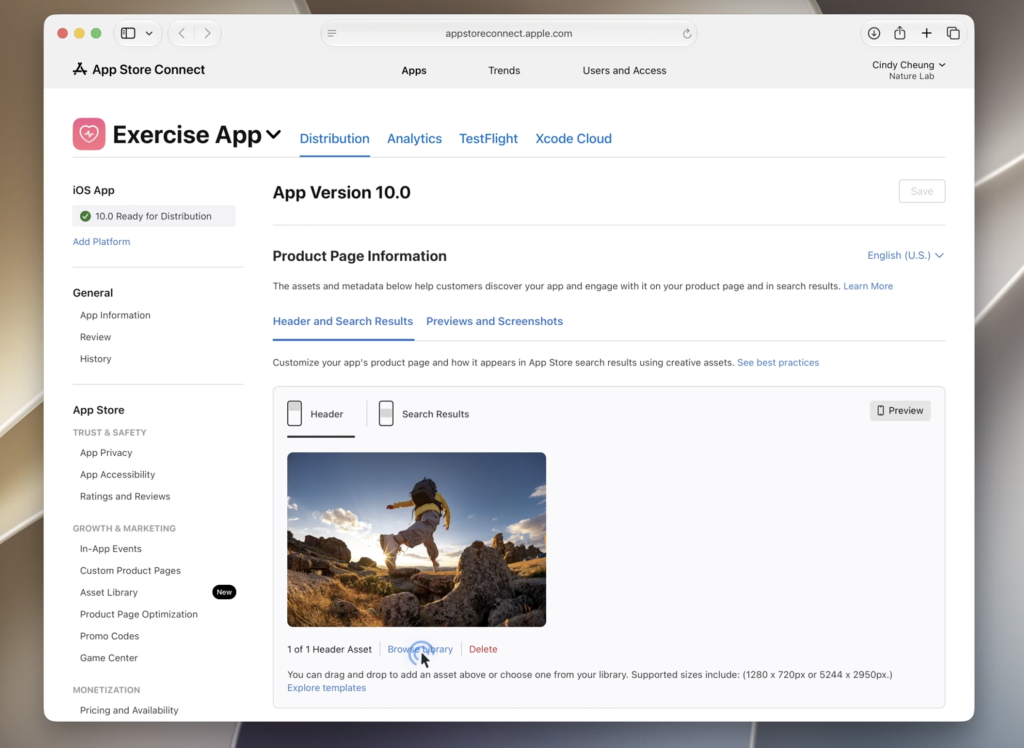
Before this, updating store creative meant bundling changes into an app version submission, which meant waiting on an engineering release. You can now submit new assets directly, get them reviewed, and update the listing without having to wait for a new build of the codebase.
Personalized Collections
Apple is adding Personalized Collections across the Apps, Games, and Search tabs. These collections are based on user interests, app usage, downloads, and other App Store signals, with explanations for why each app is relevant. This means that discovery may become more recommendation-led rather than keyword-led only.
Placements: What Changed Where
Product Page Header
Both the main product page and Custom Product Pages can now use Creative Assets in the header. These assets don’t need to match your product page screenshots and app preview; they’re separate content designed for that placement specifically. This applies to iOS 27 and iPadOS 27.
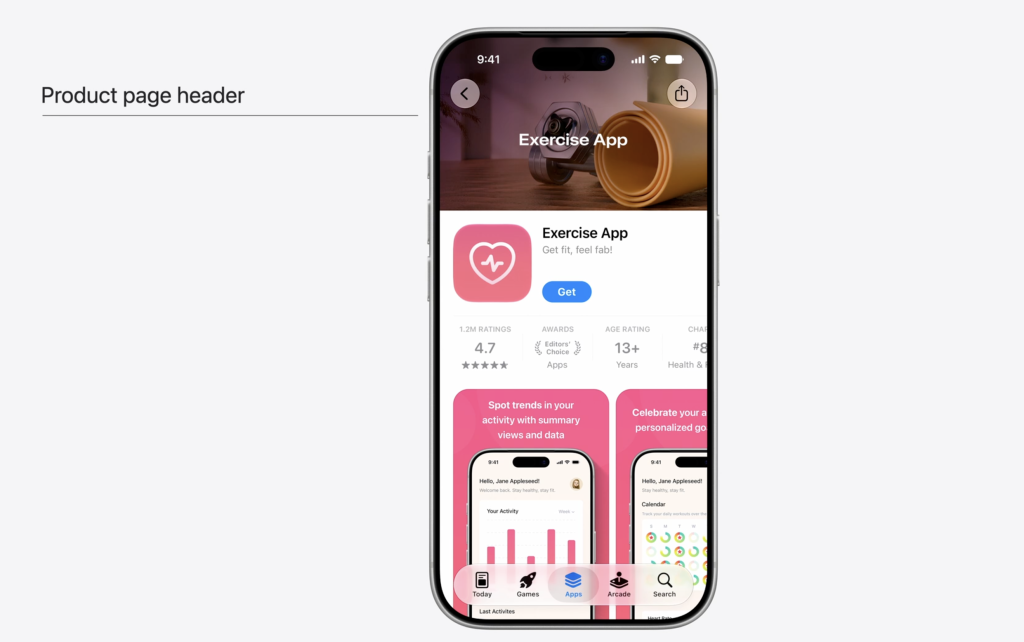
The new Asset Library of the App Store Connect now includes a product page preview that shows how your visual assets (header, screenshots, app preview, in-app events) appear on iPhone and iPad across different sizes and product pages. Useful for catching layout issues before anything goes live.
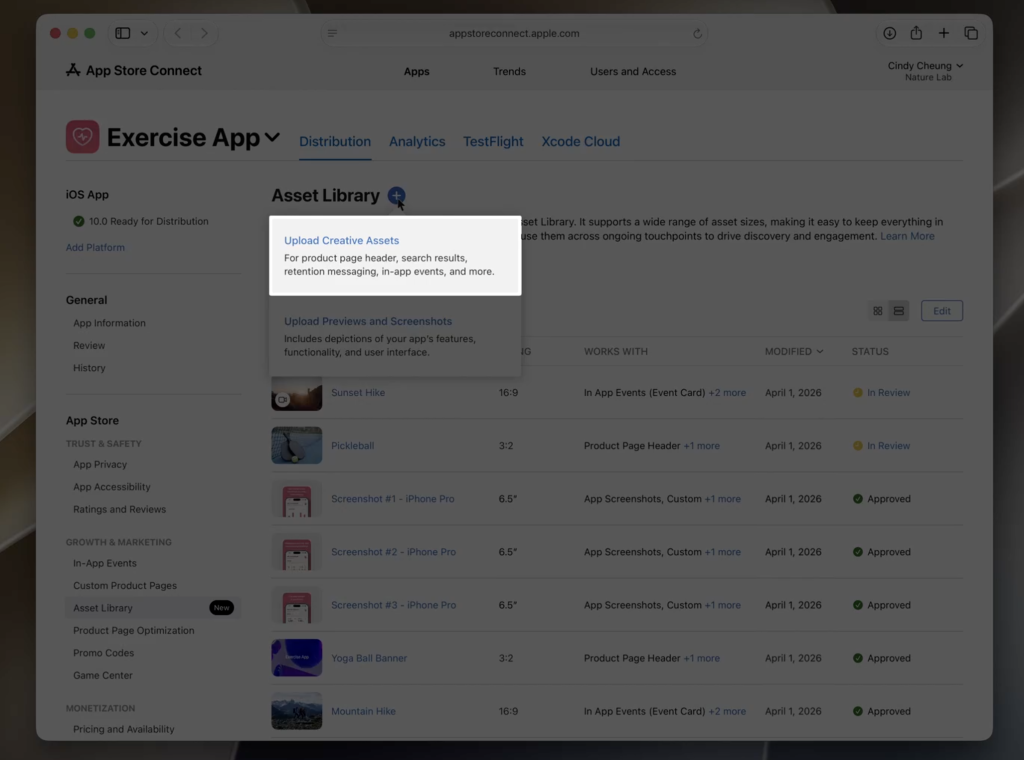
App Store Search Results
You can now choose which visual assets appear in organic keyword search results, including the header asset. The creative a user sees when they search for a term relevant to your app can be tailored to that context, rather than the default assets Apple pulls from your existing screenshots and app preview.
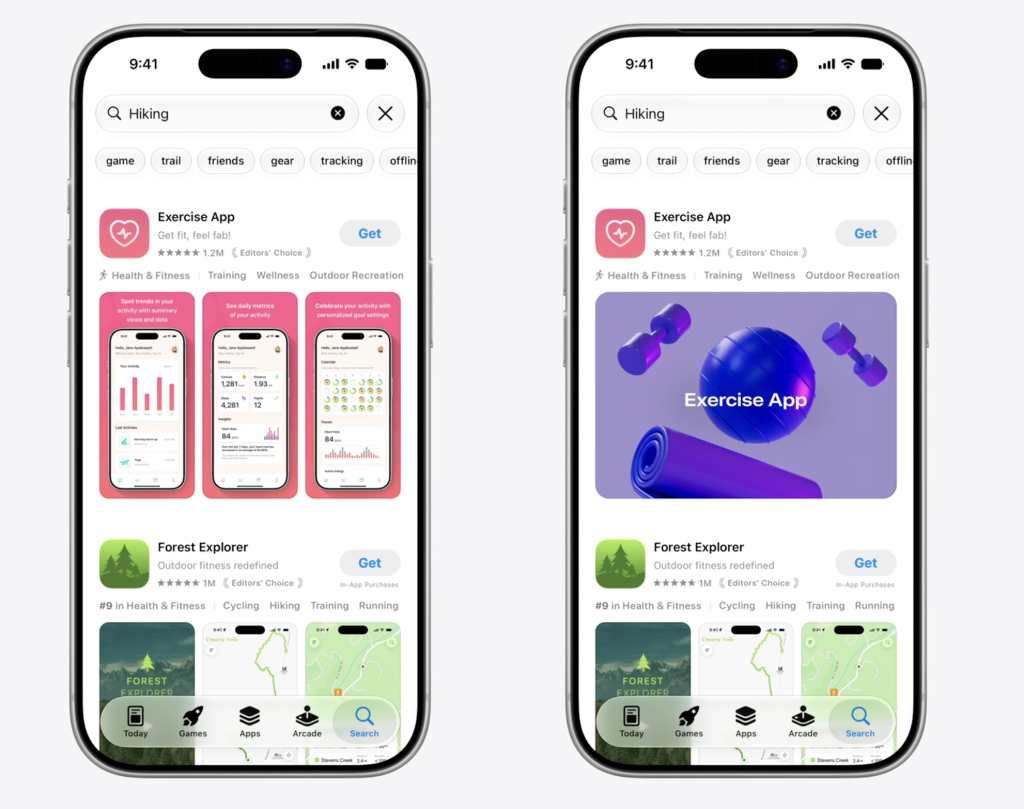
Custom Product Pages (CPPs)
Two updates. First, CPPs now support the header visual, so a custom page can have a different hero asset from your main product page. Second, Apple has enhanced their deep linking feature on CPPs, which lets you route users directly to a specific section of your app after installation. For teams running web-to-app campaigns, this helps ensure the post-install experience aligns with what was promised in the ad or on the landing page.
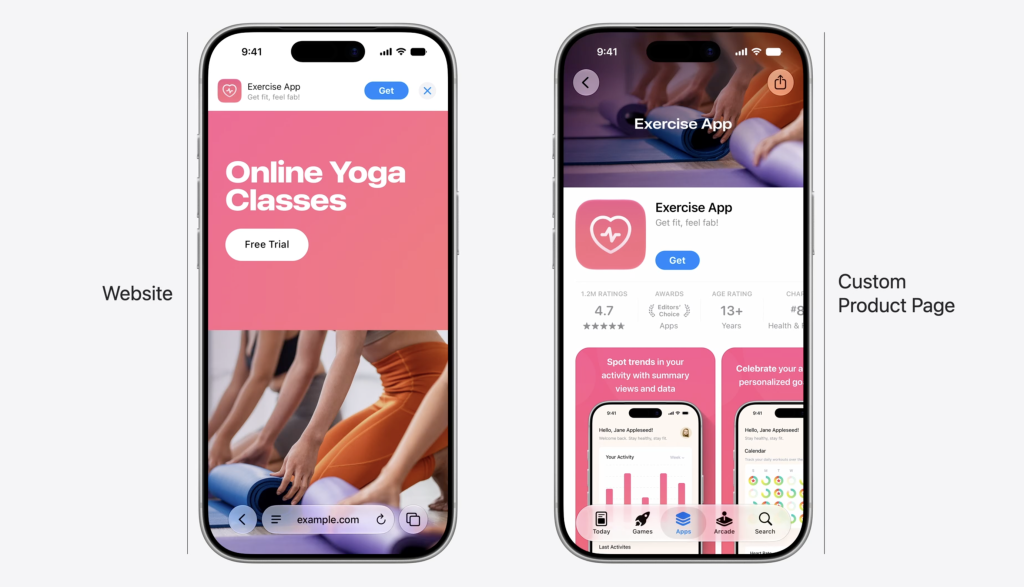
Apple Ads
Creative Assets work in paid placements too. According to Apple’s Creative Assets for ads guide, you can select specific assets for Search ads and Today Tab ads, and since everything lives in the same Asset Library, paid and organic creative can be managed together.
Before, the Today Tab ads portrayed an animated display of the different CPP visuals, without an option to select one specific visual to optimize the Conversion Rate of your ads strategy.
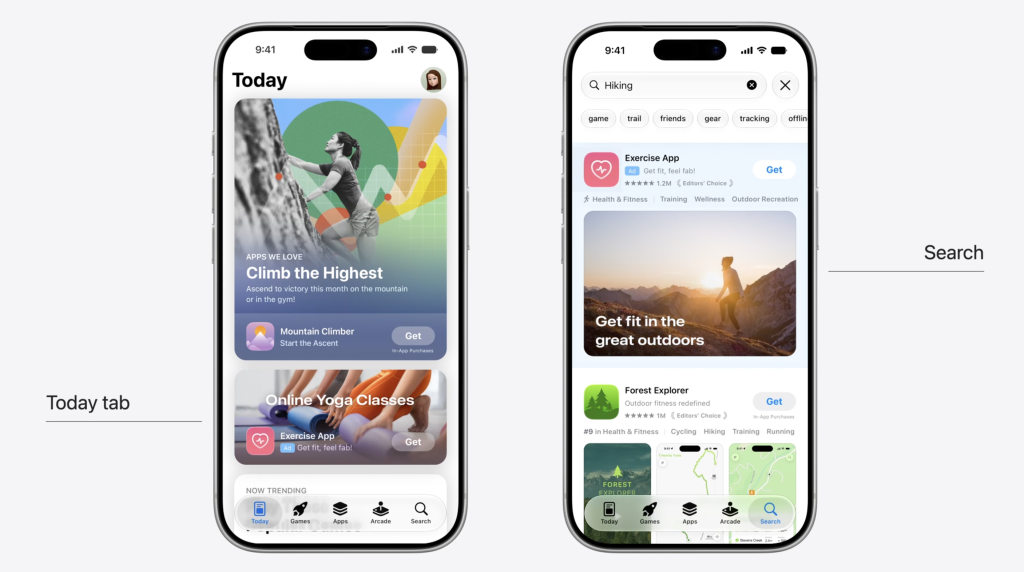
Product Page Optimization (PPO)
Two changes. First, you can now preview assets before launching a test, saving time that would otherwise be spent running a test just to spot a rendering issue. Second, the header is now a testable element in PPO. Previously, you could test screenshots, app previews, and the icon; the header was fixed. Now it’s included, which gives you another variable to experiment with for conversion rate.
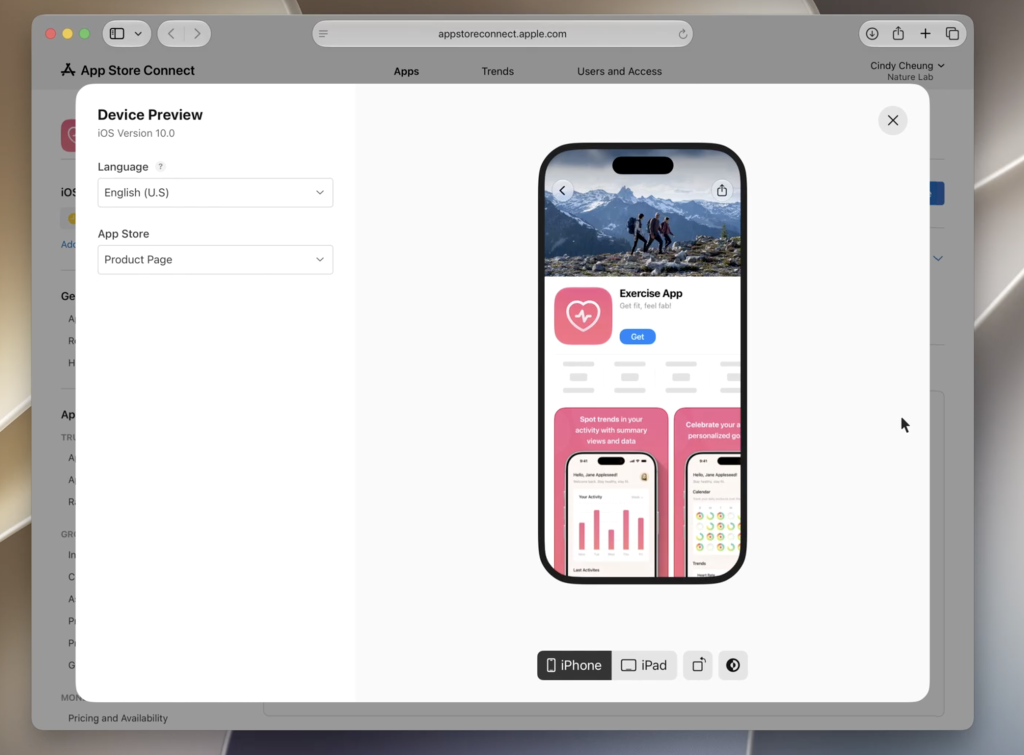
Workflow Implications
The most practical change in this update is decoupling asset submission from app releases. The old process: identify a creative change -> design produces assets -> assets go into the next app submission -> engineering submits a build -> Apple reviews the build -> update goes live. Every creative refresh consumed engineering time and was tied to the release calendar. The new process specifically excludes engineering from asset changes. You submit assets to the Asset Library, App Review approves them, and they go live. That makes it easier to respond to seasonal moments, coordinate with Apple Ads campaigns, or follow up quickly on PPO test results without waiting for the next app version.
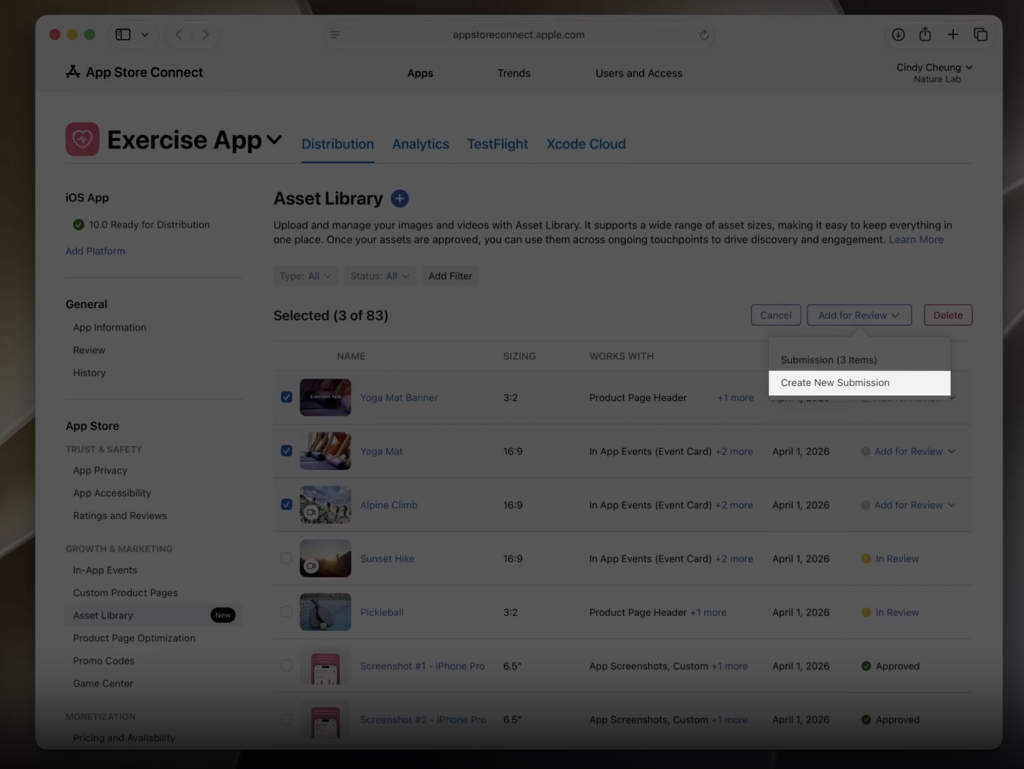
The reuse capability also simplifies things if you manage multiple CPPs. Instead of uploading the same assets separately for each page, you upload them once to the library and pull them across pages and In-App Events.
Apple Intelligence and Siri
App Intents and SiriKit
Apple issued a formal deprecation notice for SiriKit at WWDC26, with App Intents now the framework for connecting your app to Siri, Spotlight, Shortcuts, and other system surfaces. SiriKit apps still compile and run for now, but they’ll show deprecation warnings. Apple has indicated a support window of roughly two to three years.
App Intents allows Siri to call into specific functions of your app even when the user hasn’t opened it. Apps without App Intents integrations won’t show up in Siri interactions that chain actions across apps. That’s not an emergency today, but it’s worth planning for if you have SiriKit code that needs to be migrated.
The New Siri Experience
In iOS 27, Siri is now called Siri AI and appears as a bubble in the Dynamic Island. It draws on a semantic index of the user’s personal data, including emails, files, photos, and calendar, to answer contextual queries. There’s also a standalone Siri AI app for longer chat-style conversations with follow-up questions.
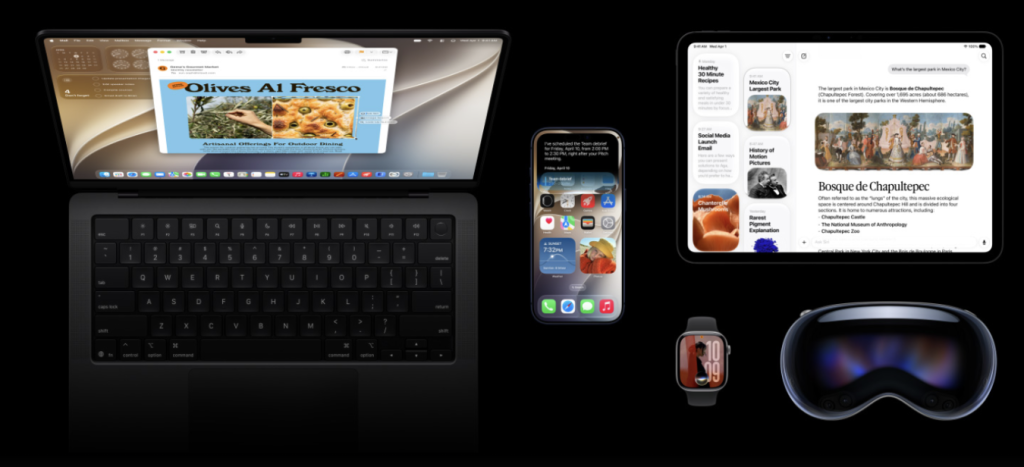
The scope of what Siri AI can access goes beyond just triggering app actions. Developers can now choose to expose content from within their app through the new index, meaning Siri AI can read and interact with actual in-app content, not just launch features. Apple demonstrated this with a messaging app in which a user asked Siri questions about specific messages and replied directly through Siri, without opening the app at all. If this gets widely adopted, it could reduce how often users open apps directly, since they can access content through the assistant instead.
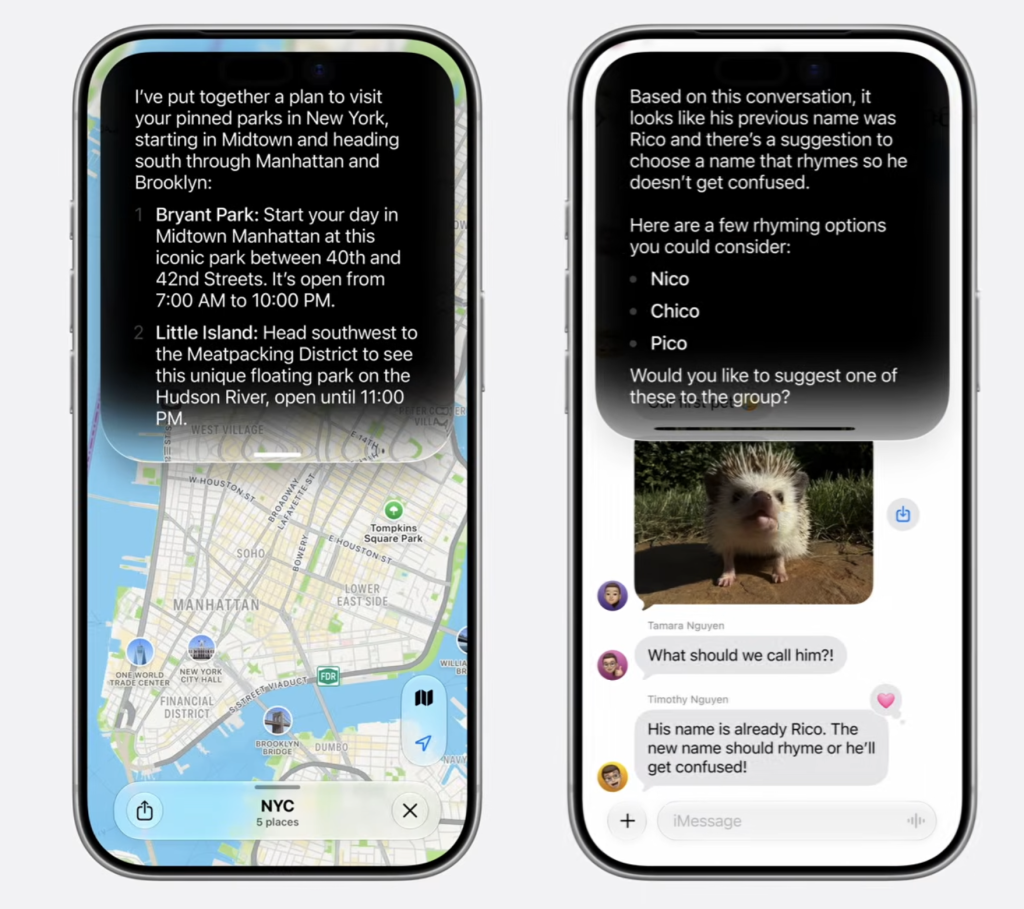
For app developers, the main implication is App Intents: apps that expose their core actions and content through the framework can be surfaced directly by Siri AI. Apps that don’t are harder to reach through that surface.
One important caveat: Siri AI will not be available in the EU at launch due to the EU Digital Markets Act (more info)
Privacy
Apple’s AI stack uses on-device processing where possible, with Private Cloud Compute for heavier tasks. WWDC26 added privacy manifest APIs that let developers declare, per intent, whether a Siri interaction is allowed to go to the cloud or must stay on-device. For apps handling sensitive data, that’s a new control worth knowing about.
7. Apple In-App Purchase and StoreKit Updates
Streamlined Apple In-App Purchase submission
Apple is improving the In-App Purchase submission workflow in App Store Connect. Instead of submitting IAPs one by one, teams will be able to group multiple In-App Purchases, including subscriptions, into a single submission. IAP submissions can also be combined with related review items such as In-App Events, custom product pages, and PPO tests, with status and App Review messages managed in one centralized view. Support for App Store Connect web and the App Store Connect API is coming later this summer.
Retention Messaging
A new Retention Messaging feature lets subscription apps show cancellation-stage messaging that reminds users of the subscription value and can include a special offer. This is especially relevant for lifecycle, CRM, and monetization teams because it adds an App Store-native save flow without adding extra friction to cancellation. Apple says Retention Messaging is coming this fall.
Subscription Bundles and Suites
Apple is adding Bundle and Suite options for auto-renewable subscriptions. Bundles let users purchase access to multiple subscriptions in a single subscription. Suites let developers sell a set of subscriptions together when those subscriptions are not available standalone. This could matter for publishers, fitness apps, education products, multi-app ecosystems, and products with tiered access models. More information on requesting Bundle and Suite functionality is expected later this summer.
Group Purchases and Volume Purchasing
Apple is introducing Group Purchases and Volume Purchasing for subscriptions. Group Purchases let one subscriber buy multiple seats and invite others, with Apple handling the invitation flow. Volume Purchasing makes subscriptions available to enterprise and education buyers through Apple School Manager and Apple Business, with seat management handled through existing device and identity workflows. Apple says Volume Purchasing subscriptions are coming this fall, while Group Purchase options are coming later this year.
Monthly subscriptions with a 12-month commitment
Apple has added monthly subscriptions with a 12-month commitment. Users pay monthly, but commit to a 12-month term, with visibility into completed and remaining payments in their Apple Account and renewal reminders from Apple. Apple says this is available now on iOS 26.4, iPadOS 26.4, macOS Tahoe 26.4, tvOS 26.4, and visionOS 26.4 or later, except in the United States and Singapore.
iOS 27 and iPadOS 27
iOS 27 is a stability and performance release. Apple focused on CPU scheduling and resource management rather than feature additions. Swiping between Home Screen pages and importing images in Photos are specifically called out as faster. Apple is maintaining compatibility with all iPhones running iOS 26.
Apple Intelligence is integrated across iOS 27, with on-device models coordinating with Private Cloud Compute. A semantic index from Spotlight provides the system with personal context, and App Intents allow it to act within apps.
iPadOS 27 brings a rebuilt Spotlight indexing backend, file transfers in Files reportedly up to five times faster, and Apple Intelligence running on Google’s Gemini models. Image Playground can generate realistic images using photos from your library, and Shortcuts can now be created from natural-language prompts.
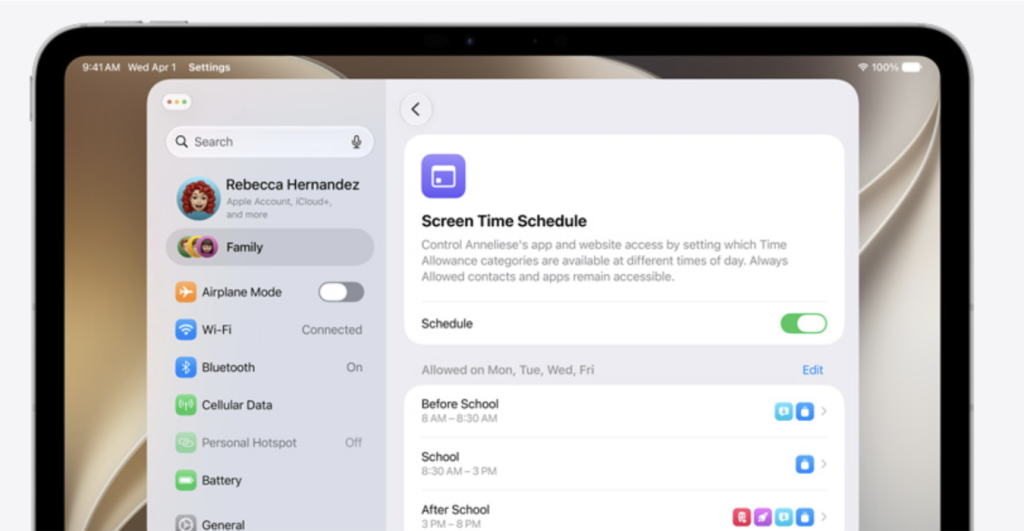
Parental Controls got an update: Screen Time has a redesigned interface, easier child account setup, more granular controls for app and website access, and new Time Allowances. Communication Safety now covers gore as well as nudity. Worth checking if your app targets younger audiences or families, since those controls affect what’s accessible.
macOS 27 “Golden Gate”
Intel support is dropped. macOS 27 requires Apple Silicon. Rosetta 2 remains for running Intel-compiled apps but will be removed in macOS 28. If you have a Mac app still supporting Intel, that’s a one- to two-year runway before the translation layer goes away.
Siri is now accessible via Spotlight. Typed prompts in Spotlight route to the AI-driven Siri, which handles personal data queries and follow-up questions. The same App Intents logic applies on Mac: apps with integrations can be surfaced there too.
macOS 27 is otherwise a quality-of-life update, with Liquid Glass refinements, performance improvements, and Apple Intelligence integration, without a major redesign.
watchOS 27 and visionOS 27
watchOS 27 is primarily a maintenance release focused on bug fixes and performance. Better heart-rate tracking algorithms are expected. The Modular Ultra watch face is expected to be available on non-Ultra Watch models. AI features introduced in watchOS 26, like Workout Buddy and live translation, are expected to expand when paired with an iPhone. visionOS 27 adds a 3D Siri widget you can place in your visionOS environment and activate by looking at it, no wake word needed. Panoramic photos can be turned into immersive 3D surroundings. Spatial Reframing lets users adjust spatial photos with AI filling in missing areas. Accessibility updates include eye-tracking control for powered wheelchairs and AI-generated subtitles.
What to Act on First
Start thinking about Creative Assets before iOS 27 ships. The header is a new placement that can carry different content from your screenshots. If your screenshots do double duty as branding, this lets you separate those jobs. Worth getting design involved early since these are net-new assets, not repurposed ones.
Check your CPPs if you’re running web-to-app. Deep-linking from CPPs means you can now make the post-install experience more consistent with your campaign creative. If there’s a gap between what your ads promise and what users see first when they open the app, that’s worth closing.
Plan around independent asset submission. The ability to refresh store creative without an app release changes when and how often you can run updates. Seasonal windows, Apple Ads coordination, quick PPO follow-ups: all of these are easier when creative and engineering releases are decoupled.
Add header testing to your PPO queue. The header is now testable. If you run regular PPO tests, this is a new variable to fold in.
If you have SiriKit code, start mapping the App Intents migration. It’s not urgent today, but Apple has started the deprecation clock, and documentation is now available.
FAQ
Do Creative Assets replace screenshots?
No. Screenshots and app previews stay as they are. Creative Assets are additional: a separate type for the header and search results that doesn’t need to match your screenshots.
When will Creative Assets be available?
Developer betas of iOS 27 and iPadOS 27 are live now. The public rollout is expected with the iOS 27 release this fall. Early betas can be unstable, so production use should wait for the stable release.
Can Creative Assets be used on CPPs?
Yes. They work with Custom Product Pages and PPO, so you can use them across both custom and default product pages.
Can I use Creative Assets in Apple Ads?
Yes. You can select specific Creative Assets for Search ads and Today Tab placements. Apple’s guide on designing ads with Creative Assets covers the setup.
Can I test the header in PPO now?
With the iOS 27 update to PPO, yes. The header is now an available test element alongside screenshots, app previews, and the icon.
Do I need to submit a new app version to update Creative Assets?
No. You submit assets to the Asset Library for App Review independently of an app update, and update the listing once they’re approved.
What’s in the Asset Library?
Screenshots, app previews, Creative Assets, marketing media, and videos, organized across platforms, sizes, and placements. Assets can be reused across CPPs and In-App Events without re-uploading.
What is App Intents and why does SiriKit deprecation matter for growth teams?
App Intents is the framework that lets Siri AI, Spotlight, and Shortcuts call into functions of your app. Apple deprecated SiriKit at WWDC26, making App Intents the only path for Siri AI to interact with third-party apps going forward. If your app has SiriKit integrations, they’ll still work for now but will need to be migrated within a few years.
Does this apply to iPad too?
The Creative Assets and Asset Library changes apply to iOS 27 and iPadOS 27. Apple Intelligence and App Intents apply across iOS, iPadOS, and macOS 27.
Does macOS 27 support Intel Macs?
No. macOS 27 requires Apple Silicon. Rosetta 2 stays for Intel app compatibility in macOS 27 but will be removed in macOS 28.
Is Siri AI available in the EU?
No. Siri AI will not be available in the EU at launch due to the EU Digital Markets Act
Table of Contents