













Your app generates data constantly, but which metrics actually help you understand what that data means?
Application performance monitoring metrics show what’s working, what’s broken, and where to focus next. Here at Phiture, we’re constantly thinking about the metrics that are critical for teams looking to grow. We’ve written this guide to cover the most important mobile application performance metrics that matter for growth, retention, and revenue. We’ll also break down what each metric measures, how to calculate it, and what its importance is.
What Are Application Performance Metrics?
Application performance metrics are measurable values that indicate how your app performs across technical, engagement, and revenue dimensions. Simply put, they help product and growth teams identify problems, validate hypotheses, and prioritize improvements.
Different application monitoring metrics serve different purposes: some reveal technical issues like slow load times or crashes, while others show user behavior patterns. A few connect directly to revenue. The goal is tracking the right mobile app KPIs for your current priorities, not tracking everything.
Engagement Metrics
 At their core, engagement metrics reveal whether users find value in your app and keep coming back. They can be broken down as follows:
Downloads and Installs
Downloads count how many times users initiate your app download from the app store. Installs track completed installations on devices.
The gap between these numbers matters. A large difference suggests friction in the installation process or users abandoning before completion.
What we suggest: Optimize your app store listing with clear screenshots and descriptions, and reduce app size where possible. Also, partner with your marketing department to drive qualified traffic rather than just volume.
Daily Active Users (DAU)
DAU counts unique users who open your app each day. This metric is the foundation for understanding daily engagement patterns.
What’s important here is to understand that DAU is best understood as evolving over time, rather than obsessing over absolute numbers. Nonetheless, a sudden drop signals something changed, whether that’s an update, a competitor, or a technical issue.
What we suggest: Push notifications bring users back, but use them sparingly. In-app messaging and chat features give users reasons to return. Here, what counts is identifying your most engaged user segments and studying what keeps them coming back.
Monthly Active Users (MAU)
MAU counts unique users over a 30-day period. This metric works better for apps that don’t require daily use, such as banking, travel booking, or utility apps.
What we suggest: Email campaigns re-engage dormant users, and feature updates give users reasons to return. Remember that seasonal promotions drive periodic engagement spikes.
Stickiness (DAU/MAU Ratio)
Stickiness shows how often monthly users return on a daily basis.
Formula: (DAU / MAU) × 100
A 20% stickiness ratio is considered healthy for most app categories. Social apps often hit 50% or higher, while utility apps may sit around 10-15%.
What we suggest: Identify features that drive daily engagement and make them more prominent. Add social elements here: users return more frequently when other people are involved, and build habits through streaks, rewards, or daily content.
Session Length
Average session length shows how long users spend in your app per visit. The cross-industry average is about 19 minutes daily, though this varies significantly by category.
Remember that this metric, like a few others on the list, is contextual. For instance, a banking app doesn’t need long sessions, while a streaming or gaming app does. Context matters more than benchmarks here.
What we suggest: Reduce friction in core user flows. Add engaging content that extends sessions naturally. Be careful not to artificially inflate this metric with dark patterns—users notice.
Sessions Per User
This tracks how many times daily active users open your app. The average is around two sessions per day.
Formula: Total Daily Sessions / DAU
Higher frequency often correlates with stronger retention. Naturally, users who open your app multiple times daily are building habits.
What we suggest: Break up value delivery across multiple touchpoints. That includes notifications about new content or messages, which both drive return visits.
Retention Rate
Retention rate is one of the most important mobile application performance metrics because it shows whether your app delivers lasting value. Simply defined, retention measures the percentage of users who return after a specific period, whether that’s day 1, day 7, or day 30. Here’s a formula to help you calculate the rate:
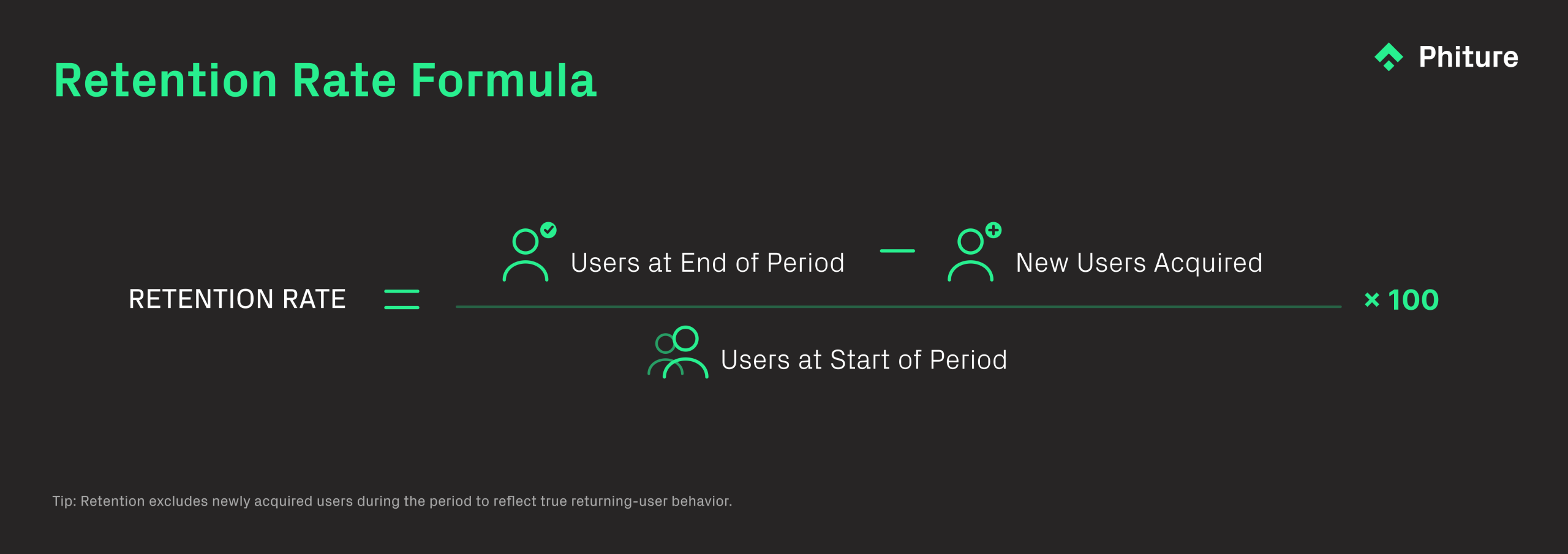
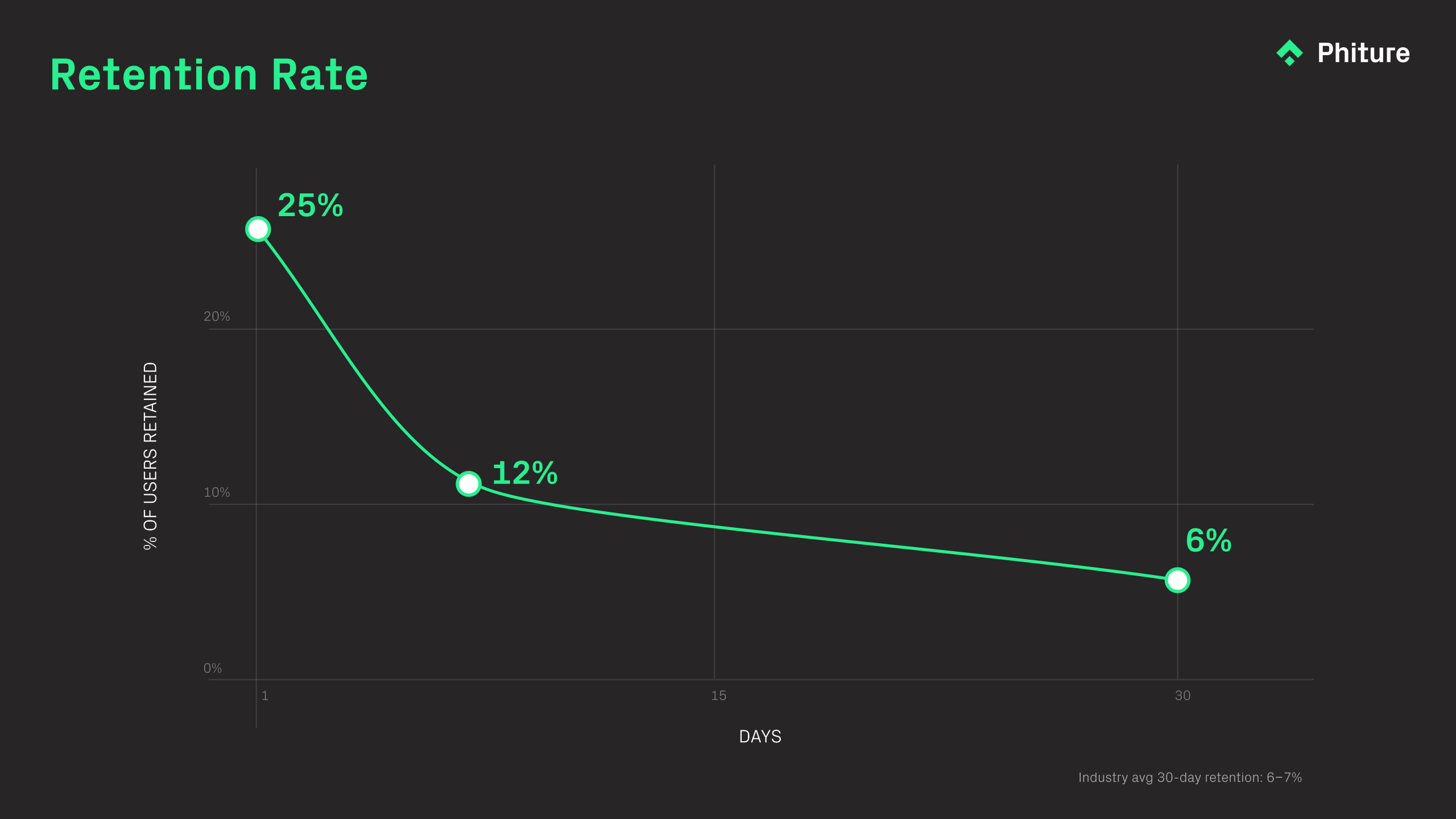
Industry average for 30-day retention sits around 6-7%. Day 1 retention averages around 25%. These numbers vary significantly by category.
What we suggest: Optimize onboarding to show value quickly, and identify where users drop off and fix those friction points. One thing we recommend is to segment users by behavior and personalize their experience. Don’t forget to check out our app user retention strategies that address your specific drop-off patterns.
Churn Rate
Churn is the total opposite of retention. It measures how many users stop using your app over a given period.
Formula: 100% – Retention Rate
Let’s say your 30-day retention is 7%. That would mean that over 30 days, your churn would 93%. Industry data shows average churn reaches 68% within three months of install.
What we suggest: We always think that churn is qualitative as much as it is quantitative. As such, surveying churned users to understand why they left is crucial. So too is analyzing behavior patterns before churn to identify warning signs. In this case, win-back campaigns can recover some lost users, but fixing root causes always works better.
Uninstall Rate
Uninstall rate tracks how many users remove your app entirely. This differs from churn in one crucial way: a churned user might still have your app installed.
Rates vary significantly by category. For example, data shows that dating apps have the highest uninstall rate of any major app category at 59.1% (30-day average), while categories like News & Magazines and Travel have the lowest rates, at 27.3% and 29.2%, respectively.
What we suggest: The key is to monitor uninstall spikes after updates. A quick win may be to reduce battery and data consumption. Moreover, sending re-engagement messages before users reach the uninstall decision point is also worth considering.
Net Promoter Score (NPS)
NPS asks users how likely they are to recommend your app on a 0-10 scale.
- Scores 9-10: Promoters
- Scores 7-8: Passive
- Scores 0-6: Detractors
Formula: % Promoters – % Detractors
High NPS correlates with organic growth through word-of-mouth, and conversely, low NPS signals underlying problems worth investigating.
Registrations and Subscriptions
While the registration rate tracks how many users create accounts after downloading, the subscription rate tracks how many convert to paid plans.
Both metrics reveal friction in your conversion funnel. Consider this: a gap between installs and registrations suggests onboarding problems, while a gap between registrations and subscriptions suggests pricing or value perception issues.
Technical Performance Metrics
Technical issues are another critical area to monitor. These can often include slow load times, crashes, and high battery drain frustrate users, which, unsurprisingly, lead to frustrated users uninstalling. These application monitoring metrics help you catch problems before they cost you retention.
Load Speed
In 2026, users expect mobile app experiences to load in under two seconds, with anything over three seconds causing a significant increase in user abandonment, according to Google’s research on mobile experience. Even a 1-second delay during app startup can lead to a 7% drop in conversion rates.
To measure load time, gauge both cold start time (launching from scratch) and warm start time (returning from background), as both matter for user experience.
What we suggest: A key tip here is to optimize images and assets, and to also lazy load non-critical content. Understanding payload size can help you do that, and don’t forget to test on lower-end devices, not just flagship phones.
App Latency
Latency measures the delay between user action and app response. Acceptable latency is two to three seconds, as anything longer creates friction.
Crash Rate
Crash rate is another crucial metric. Understanding how often your app crashes, on which devices, and at what points in the user journey will help you retain users.
Crashes during onboarding are particularly damaging, as users have no investment in your app yet and will simply leave.
What we suggest: The implementation of crash reporting tools is essential. From there, prioritize fixes by impact, with crashes affecting many users or occurring in critical flows coming first. Then, test thoroughly on the device types your users actually have.
Battery and Network Consumption
Apps that drain batteries or consume excessive data get uninstalled. Users notice when an app appears in their battery usage list.
What we suggest: Audit background processes, optimize sync frequency, and compress data transfers. Giving users control over data usage settings also helps.
Error Rate
Lastly, error rate tracks failed API calls, timeout errors, and other technical failures users encounter.
Revenue Metrics
Revenue is the final port of call when it comes to application performance metrics. These metrics tie app performance to business outcomes, and help you understand whether your app is making money, how much users are worth, and what you’re spending to acquire them.
Average Revenue Per User (ARPU)
ARPU is your total revenue divided by total users over a specific period. This metric helps you understand monetization efficiency across your user base. To find optimization opportunities, segment ARPU by user cohort, acquisition channel, or geography. Interestingly, you’ll often find that certain segments monetize significantly better than others.
Formula: Total Revenue / Number of Users
What we suggest: Increase conversion to paid features and raise prices where value supports it. Adding revenue streams like premium features or in-app purchases can also lift ARPU over time.
Customer Lifetime Value (LTV)
LTV estimates the total revenue a user will generate over their entire relationship with your app. This metric matters because it sets a ceiling for acquisition spending. If your LTV is $50, spending $60 to acquire a user doesn’t work long-term, as you’ll lose money on every new user you bring in.
Formula: ARPU × (1 / Churn Rate)
What we suggest: There are three levers here: extend user lifetime through better retention, increase ARPU through upsells and cross-sells, or reduce churn by addressing pain points. Most apps have room to improve on all three.
Cost Per Install (CPI)
CPI measures the cost to acquire one app install. Current global averages run between $1.5-$3.5 for iOS and $1.5-$4.0 for Android, though costs are significantly higher in competitive regions like North America and for genres like gaming and finance, where iOS CPIs can exceed $6.00
Formula: Total Ad Spend / Number of Installs
What we suggest: Optimize ad creative and targeting, and test different channels and audiences. Improving your app store conversion rate also helps; remember that when more clicks become installs, your effective CPI drops.
Cost Per Acquisition (CPA)
CPA measures the full cost to acquire a paying or converting user, not just an install.
The difference between CPI and CPA is significant. While the global average CPI for apps is highlighted above, the cost to drive a valuable in-app action like a first purchase is typically many times higher.
What we suggest: Improve onboarding to convert more installs into active users, and optimize the path to first purchase. When evaluating acquisition channels, focus on the ones that deliver users who actually convert, not just users who install and disappear.
Return on Investment (ROI)
ROI tells you whether your overall app investment is paying off. This metric should be reviewed regularly and broken down by channel, campaign, and user cohort to identify what’s working and what isn’t.
Formula: (Revenue – Investment) / Investment
What we suggest: The formula for improving ROI is straightforward: increase LTV while decreasing CPA. In practice, this means cutting underperforming acquisition channels and improving monetization of existing users.
App Store Conversion Rate
This measures the percentage of store page visitors who actually install your app. According to the latest benchmarks, the average conversion rate across all app categories is 25% on the iOS App Store and 27.3% on Google Play for the US in 2024.
This metric is critical because improving your page conversion directly amplifies the efficiency of your user acquisition spend. Thatmeans that better conversion means more installs from the same amount of traffic.
Formula: (Installs / Store Page Views) × 100
Time to First Purchase
This metric measures how long new users take to make their first purchase after installing.
Shorter times generally indicate effective onboarding and clear value communication. If users take weeks to convert (or never do), something in your early user experience likely needs attention.
What we suggest: Show value quickly during onboarding and reduce friction in the purchase flow. Testing different timing for purchase prompts can also help you find the right moment to ask.
Quick Reference
| Metric | What It Measures | Benchmark | Category |
| DAU | Daily engagement | Varies | Engagement |
| MAU | Monthly engagement | Varies | Engagement |
| Stickiness | Habit formation | 20%+ healthy | Engagement |
| Session Length | Time in app | ~19 min average | Engagement |
| Sessions Per User | Return frequency | ~2 per day | Engagement |
| Retention (Day 1) | Early value delivery | ~25% average | Engagement |
| Retention (Day 30) | Long-term value | 6-7% average | Engagement |
| Churn (Month 3) | User loss | 68% average | Engagement |
| NPS | User satisfaction | Positive is good | Engagement |
| Load Speed | App responsiveness | Under 3 seconds | Technical |
| Latency | Response time | 2-3 seconds max | Technical |
| Crash Rate | App stability | Lower is better | Technical |
| ARPU | Revenue per user | Varies by model | Revenue |
| LTV | User lifetime value | Sets CPA ceiling | Revenue |
| CPI | Install cost | $1.51-$3.21 | Revenue |
| CPA | Acquisition cost | Varies widely | Revenue |
| ROI | Investment return | Positive target | Revenue |
| Store Conversion | Listing effectiveness | 31-32% average | Revenue |
Choosing Which Metrics to Track
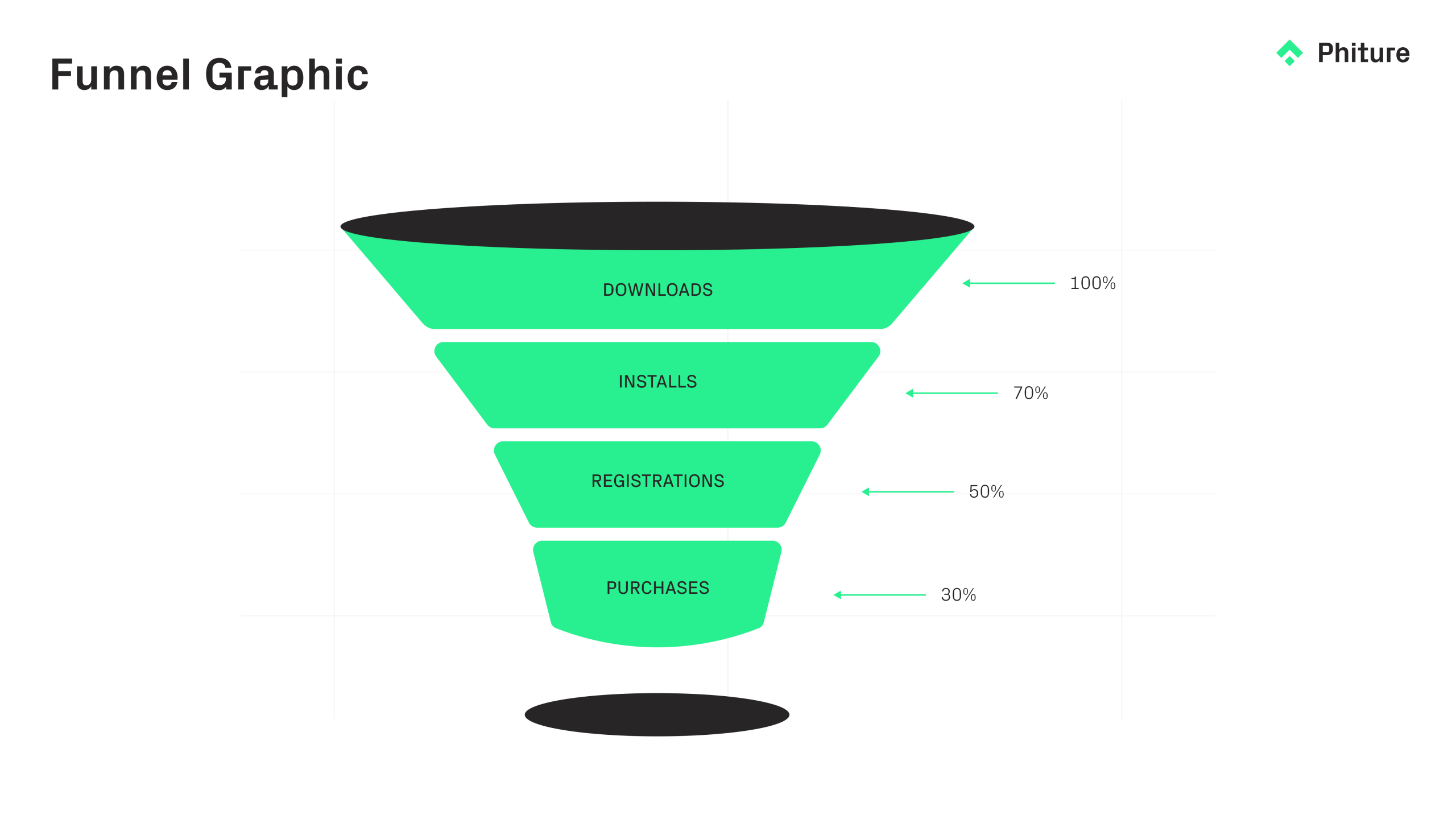 With dozens of possible metrics, it may be overwhelming to choose which metrics matter most to you. We recommend that you start with 10-15 metrics aligned to your current priorities and expand from there as needed.
Remember: the right metrics depend on what your team is trying to achieve. Growth-focused teams typically emphasize downloads, retention, and acquisition costs; these numbers that show whether the user base is expanding efficiently. Monetization-focused teams tend to prioritize ARPU, LTV, and conversion metrics, since these connect most directly to revenue. Teams troubleshooting technical issues will want to watch load speed, crash rates, and latency closely, as these often explain drops in engagement or retention that might otherwise seem mysterious.
Whatever metrics you choose, the value comes from consistent tracking over time. A single data point tells you very little. But when you review the same metrics week after week, patterns emerge. You start to see how product changes affect retention, how marketing campaigns influence acquisition costs, and how technical performance correlates with user satisfaction.
At Phiture, we help mobile teams build measurement frameworks that connect metrics to actions. Our Mobile Growth Stack provides strategic scaffolding for identifying what to track and how to interpret it, while tools like Catchbase help optimize acquisition spend based on real performance data.
FAQ:
1. What are application performance monitoring metrics?
Application performance monitoring metrics are measurable indicators that track how well a mobile app performs across technical stability, user engagement, retention, and revenue. These metrics help growth and product teams detect issues, validate improvements, and optimize performance over time.
2. Why are application performance metrics important for mobile growth teams?
Application performance metrics connect product experience to business outcomes. By tracking metrics like retention rate, crash rate, ARPU, and app store conversion rate, mobile teams can identify bottlenecks in acquisition, engagement, and monetization and prioritize improvements accordingly.
3. What are the most important mobile app performance metrics?
The most important mobile app performance metrics typically fall into three categories:
-
Engagement metrics (DAU, MAU, retention rate, stickiness)
-
Technical performance metrics (load speed, crash rate, latency)
-
Revenue metrics (ARPU, LTV, CPI, CPA, ROI)
The right mix depends on whether your focus is growth, monetization, or technical optimization.
4. How do you calculate retention rate in a mobile app?
Retention rate measures the percentage of users who return after a specific period.
Formula:
Retention Rate = (Users who return during a period / Users who installed during the same cohort period) × 100
For example, if 1,000 users installed your app and 250 returned on Day 1, your Day 1 retention rate is 25%.
5. What is the difference between CPI and CPA?
CPI (Cost Per Install) measures how much you spend to acquire one install.
CPA (Cost Per Acquisition) measures how much you spend to acquire a user who completes a meaningful action, such as registering or subscribing.
CPA is typically higher than CPI because not all installs convert into valuable users.
6. What is a good app store conversion rate?
App store conversion rate measures the percentage of store visitors who install your app.
Formula:
App Store Conversion Rate = (Installs / Store Page Views) × 100
Benchmarks vary by category and geography, but improving conversion rate directly increases acquisition efficiency and reduces effective CPI.
7. How many app performance metrics should a team track?
Most mobile growth teams start with 10–15 core metrics aligned with their current goals. Tracking too many metrics can create noise. The key is consistent monitoring and linking each metric to a clear action or decision.
Table of Contents